I created my first blog on blogger with a blogspot subdomain, published some generic articles, I remember it was about smartphone, I was into tech. Ofcourse it failed as I didn’t even know what SEO was, later I wanted traffic and did my research on SEO and started another blog and the SEO thing worked it was averaging 40 thousand pageviews per month from google search.
I don’t know how many bloggers now use Blogger.com but those who are using blogger or starting new as a beginner these SEO tips for Blogger will specifically help them for sure.
Blogger already provides many SEO features, including search-engine visibility, custom robots settings, HTTPS, descriptions, permalinks, and redirects.
This Blogger SEO settings 2026 guide explains the important settings you should use and the settings you should avoid changing unnecessarily.
1. Enable Search Engine Visibility
First, make sure Google, Bing and other search engines are able to discover your blog.
Go to:
Blogger Dashboard > Settings > Privacy
Turn on:
Visible to search engines
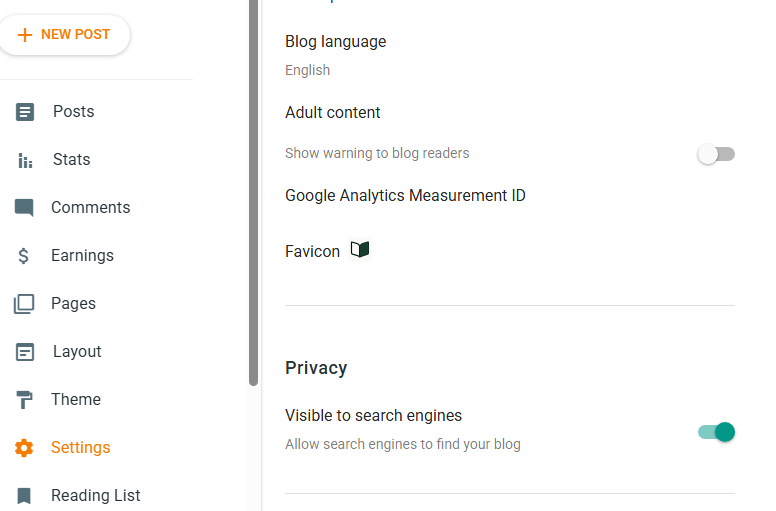
If this is disabled, none of your pages will get indexed.
After enabling it, give search engines time to crawl and process your site. Although it depends on how strong your article in quality.
2. Write a Strong Blog Title
Go to:
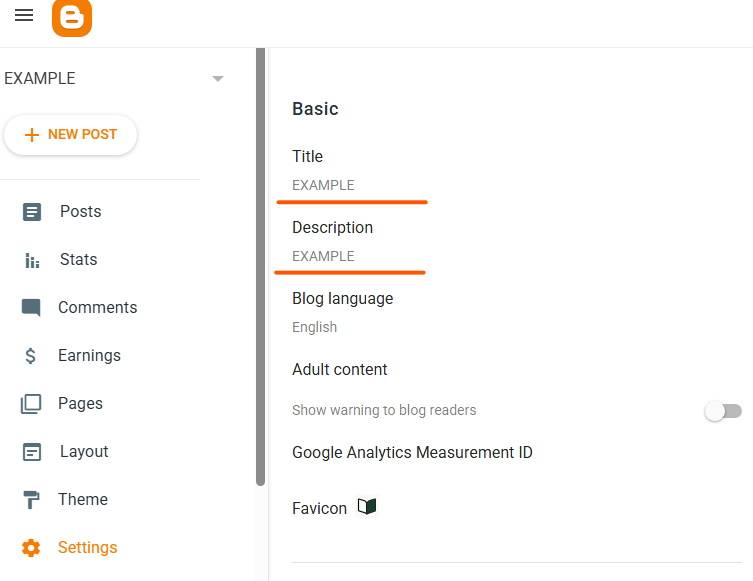
Settings > Basic > Title
Your blog title should not just include your domain name it should have related keywords about what your site offers to people.
For example:
TechNation – Tech News, Smartphones, Comparisons and More
Avoid stuffing keywords into the title It looks bad and can hurt SEO. Make it natural and recognizable as a brand.
Blogger’s current settings include fields for your blog’s title and description.
3. Optimize Your Blog Description
Go to Settings > Basic > Description
write a short description explaining what readers can expect from your blog. You need to keep it natural too not too many keywords.
Your description should be written for people first rather than as a list of keywords.
4. Use HTTPS
HTTPS should be enabled for your Blogger website.
For a Blogger blog, check:
Settings > HTTPS
Recommended:
HTTPS availability: Yes
HTTPS redirect: Yes
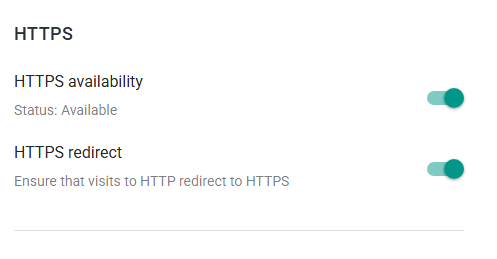
HTTPS provides a secure connection and prevents visitors from being unnecessarily sent to an unsecured HTTP version of your site. Readers won’t feel safe visiting your blog.
If you’re using a custom domain, also make sure the domain configuration and HTTPS settings work correctly together.
5. Create SEO-Friendly Permalinks
One of the most important Blogger SEO settings is your post URL.
When creating a post, go to:
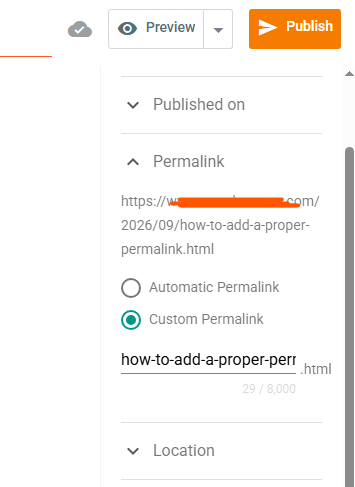
Post Settings > Permalink > Custom Permalink
For example, instead of: /2026/08/post123.html
use something descriptive such as but not too long: /2026/08/iphone-17-vs-18.html
Keep it short and descriptive.
Blogger officially supports custom permalinks through the post settings.
6. Optimize Your Post Title
Your article title is one of the most important on page SEO elements.
For example:
Weak: iPhone 17 VS iPhone 18
Better: iPhone 17 Vs iPhone 18 Comparison with real life tests.
Don’t force keywords into every title. The title should accurately describe the content and encourage the searcher to click.
7. Write a Good Search Description
Enable Meta Description first.
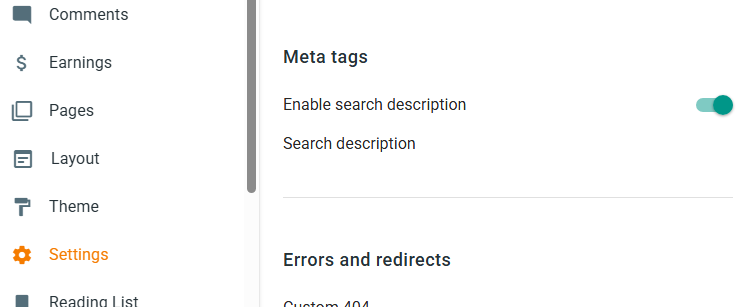
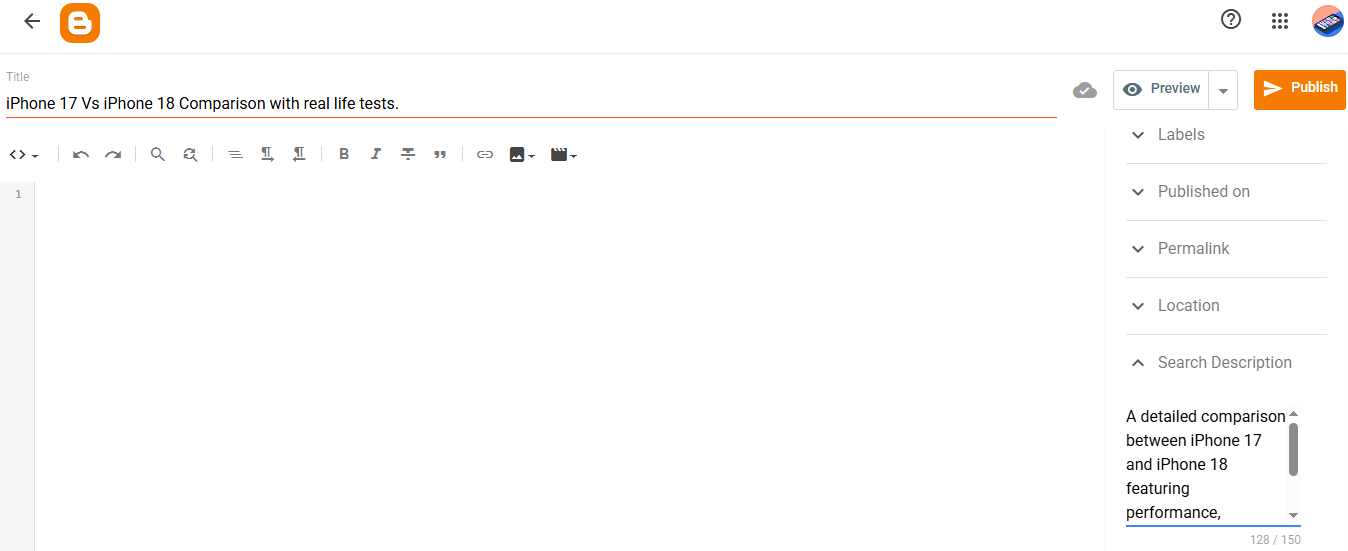
For individual posts, use Blogger’s Search description.
Write a concise description that summarizes the page.
Example: A detailed comparison between iPhone 17 and iPhone 18 featuring performance, software, camera and battery stats with real tests.
Avoid keyword repetition such as:
iPhone 17 vs iPhone 18, iphone comparison, iphone 18 compared.
Google’s systems are designed to understand page content rather than reward repetitive keyword lists.
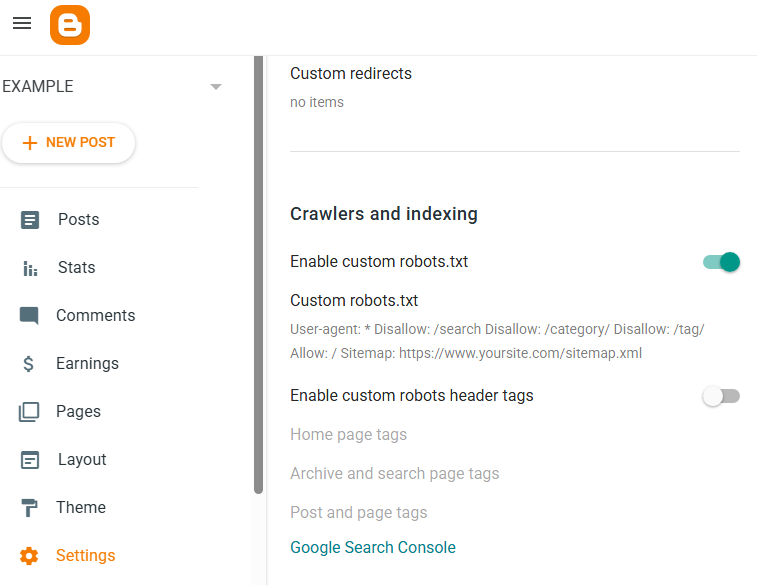
8. Be Careful With Custom Robots.txt
This is an area where many new blogger users make mistakes.
If you dont’ enable custom robots.txt that’s fine your pages will still get indexed.
But if you want to disable indexing things like search, categories and tags then use this –
User-agent: *
Disallow: /search
Disallow: /category/
Disallow: /tag/
Allow: /
Sitemap: https://www.yoursite.com/sitemap.xml
9. Don’t Randomly Configure Custom Robots Header Tags
Blogger also provides:
Settings > Crawlers and indexing > Enable custom robots header tags
These controls can specify instructions such as noindex. That’s powerful – but dangerous if configured incorrectly. For a normal blog, don’t enable custom robots header tags simply because you saw the option in an SEO tutorial. If you accidentally apply noindex to posts or pages, Google may be instructed not to include those URLs in its search index.
10. Set Up Google Search Console
If you want to take Blogger SEO seriously, connect your blog to Google Search Console. Use the same Google account as your Blogger it will automatically detect your blog without any issues.
You can speed up indexing of your url by requesting index. You can check indexing reports and errors in GSC.
Don’t send too many requests for one url at a time. You’ll get a timeout.
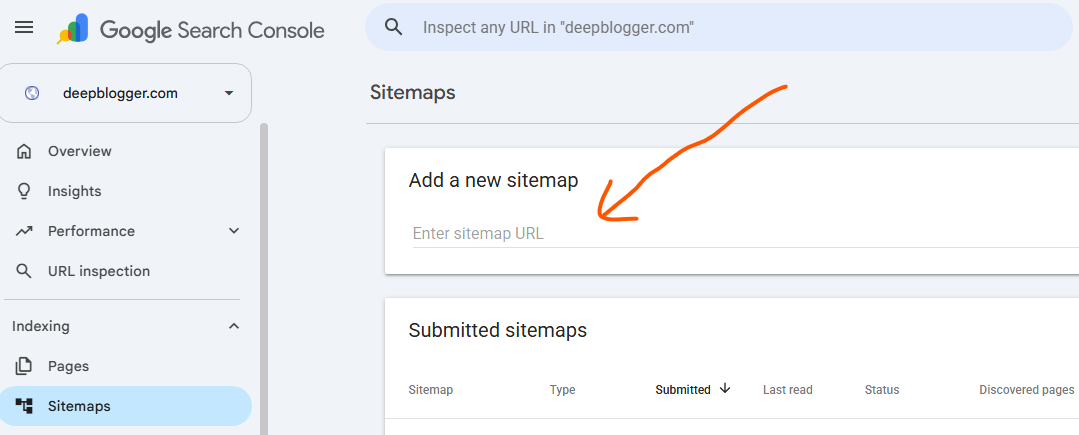
11. Submit Your Sitemap in Search Console
Blogger automatically provides sitemap functionality.
https://yourblog.blogspot.com/sitemap.xml
For a custom domain, the sitemap uses your domain.
https://yourblog.com/sitemap.xml
Go to sitemap section in GSC and paste it and submit.
12. Optimize Images for SEO
Images can improve both user experience and search visibility.
Before uploading an image:
- Use an appropriate filename. (with a valid extension like .jpg)
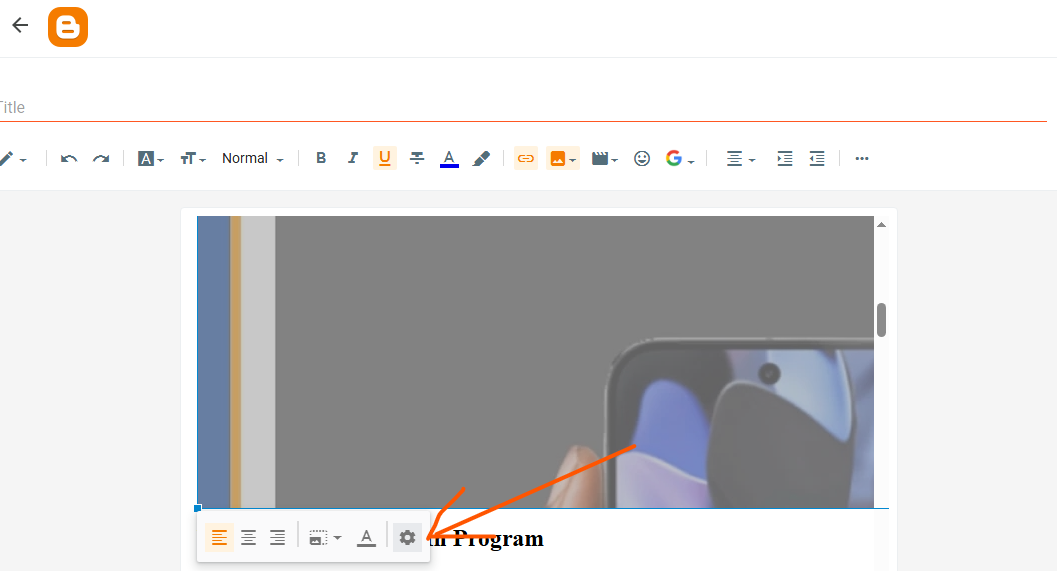
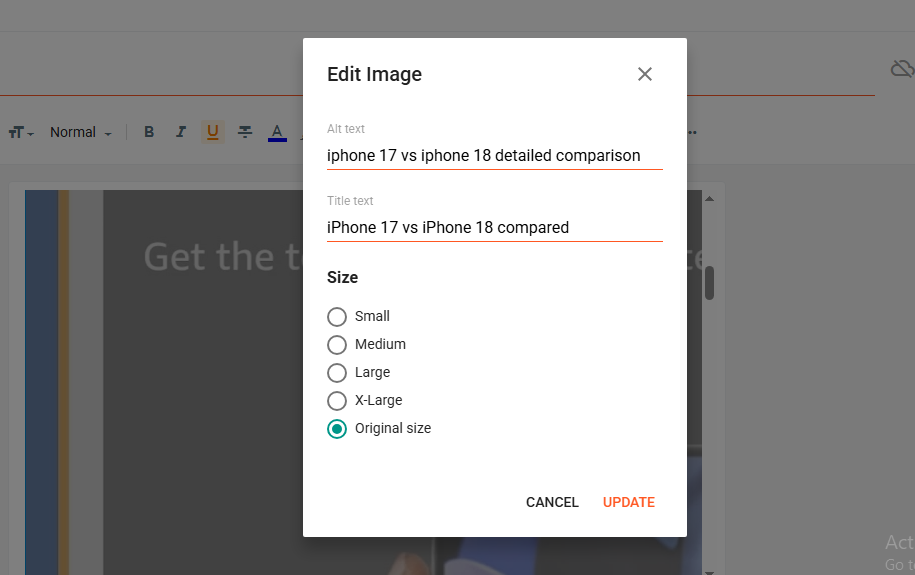
- Add meaningful alt text.
- A meaningful title
Alt text should describe the image rather than contain a collection of keywords. Short description for image title.
Example of:
Bad filename: IMG_20260828.jpg
Good filename: iPhone 17 vs iPhone 18.jpg
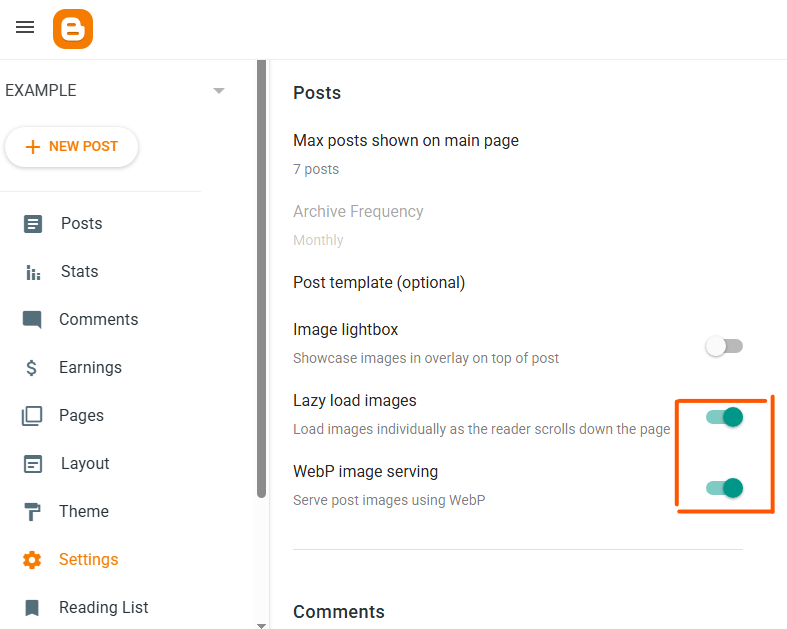
Enable – webp image serving and Lazyload images.
13. Improve Page Speed
A beautiful Blogger theme isn’t necessarily a good SEO theme. Often it comes with unnecessary codes and heavy theme code.
Avoid loading your website with:
- Excessive JavaScript
- Unnecessary widgets
- Too many advertisements
- Heavy animations
- Multiple tracking scripts
- Huge images
- Unnecessary social plugins
A lightweight, responsive design generally provides a better experience.
In my opinion use a blogger official theme like here and there and enable the hamburger menu or use the notable theme which has built in menu for Mobile users.
Test your pages on both mobile and desktop, because a site that looks good on your computer may perform poorly on a smartphone.
14. Make Your Blog Mobile Friendly
Most websites receive substantial mobile traffic, so your Blogger theme should work properly on small screens.
Check:
- Text readability a good text size is around 16-17px
- Navigation (like I said enable the hamburger menu on all pages)
- Buttons (link color – make it visible use dark colors)
- Images (use high quality images)
- Tables (focus on layout – keep it responsive for both desktop and mobile)
- Advertisements – Don’t use too many auto ads or manual ads.
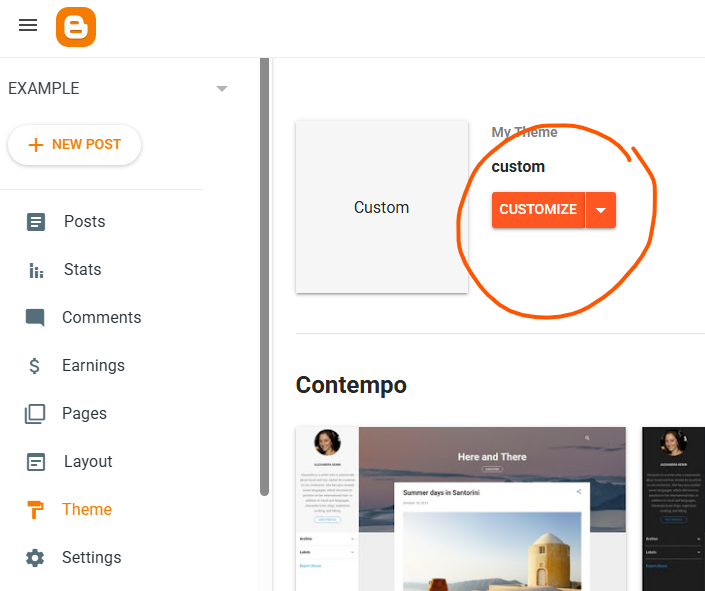
You can edit your theme just go to Theme > Customize > Select different sections to customize them.
Don’t sacrifice usability simply to place more content or advertisements above the fold.
15. Create Internal Links
Internal linking is one of the easiest SEO improvements you can make.
Suppose you have articles about:
- iPhone 18 pro review.
- Best iphones under $1000
- iphone 19 leaks
- Upcoming apple devices
You can naturally connect these articles inside an article or add them as related posts at the end of the post.
16. Use Categories and Labels Properly
Blogger labels can help organize your content.
Don’t create dozens of almost identical labels. One article may fall under 2 or 3 different categories but a lot of them for just one article doesnn’t make any sense.
17. Use 301 Redirects Carefully
Blogger includes a Custom redirects feature. You can use redirects when an old URL needs to point to a new relevant URL. However, don’t create unnecessary redirect chains or random redirects. Incorrect custom redirects can lead to indexing and redirect errors.
A good way is –
Old relevant URL > one correct new URL
Avoid:
Old URL > URL A > URL B > URL C
18. Publish Helpful & Original Content
Technical SEO cannot help you grow on Google if your content is not good. Focus on creating articles that genuinely solve the reader’s problem. It should be better than your competitors content including both info and visuals. You can use AI to get help but using AI scrapped content will get you nowhere.
19. Avoid Keyword Stuffing
Don’t just simply put the keywords on title of an article. Keep it meaningful and stuffing too many keywords won’t help, Try to place them naturally.
Quick Summary
Dos
- Visible to search engines ON
- HTTPS availability ON
- HTTPS redirect ON
- Custom permalink Use for important posts
- Search description Write one for important pages/posts
- Custom robots.txt Don’t change unless necessary
- Custom robots header tags Don’t enable without understanding them
- Internal links YES
- Mobile friendly theme YES
- Image optimization YES
- Google Search Console YES
Don’ts
- Random robots.txt configurations
- Unnecessary noindex directives
- Multiple Labels/Categories
- Redirect chains
- Keyword stuffing
- Copying other websites’ articles or AI content
- Excessive widgets
- Huge image files
- Changing URLs repeatedly
- Installing unnecessary widgets and codes
Final Words
Blogger can be really good for SEO focused micro niche blogs and these tips should be enough for your technical SEO game. But always focus on top notch content because that’s what ranks on Google now as they say – “Helpful Content”.
Also Read:
Top 5 Free Blogging Sites For Beginners
15 High RPM Blogging Niches That Can Earn More Per Visitor
From 0 to 50K Traffic – Then Losing It All (My Blogging Journey)